Prolost Watches
Prolost Watches is a private, secure databasejournalsystem for your watch collection that runs on your iPhone.
There are many watch apps. This one is mine.
My name is Stu. I did not set out to become a watch collector, but the hobby has captivated my attention and held it for years. I made Prolost Watches not to quantify my fascination, but to elevate my enjoyment of it. Here’s how I use it:
- Every watch I own is entered into the app. Every detail I want to remember, in one place.
- Every day I wear a watch, I log it. Over time, this reveals insights. In the moment, it adds to the ritual and intentionality of choosing a watch for the day.
- Throughout the day, I check the app. It surfaces memories of watches and my adventures with them. It helps me enjoy the watches I’m not wearing today — even ones I’ve let go.
- If I snap a wrist shot, I add it to Prolost Watches. These moments appear on the Map and in the Events timeline, and bubble up later for ongoing enjoyment.
- Every turn of the calendar page, I enjoy the Manifest, a report of my activities and wear habits for the previous month.
Privacy
I learned to program on a Commodore 64, and Prolost Watches is a true Gen X app: It’s a program that runs on your computer. Your computer being your phone. The point is:
- Your data is stored locally and remains private, unless you choose to share it manually.
- There’s no server, no sync, and no account.
A side effect of this is that backing up your data is also your responsibility.
Adding Watches
“A man with a watch knows what time it is. A man with two watches is never sure.”
The more information you add about your watch collection, the more enjoyment and insight Prolost Watches brings. You can get as detailed as you want, down to reference numbers and lug widths, but the key data points for each watch are:
- Brand
- Model
- Date Purchased
- Price Paid
With just this information, Prolost Watches can start showing you some fun and revealing analyses.
Let the Robot Do Your Homework
Prolost Watches can track every imaginable detail of a watch, from lug width to depth rating to power reserve. Entering all these data would be tedious — if Prolost Watches didn’t do it for you.
If you’re cool with it, Prolost Watches will look up the technical specifications of your watch for you, and use private, on-device AI to match it to the right fields.
This is, of course, a breach in the strict privacy walls of Prolost Watches. Web search privacy is subject to the browser and device settings.
Customizable Lists
When adding or editing a watch, you can specify its Type. Examples include Dive, Dress, GMT. Add as many as you like to any watch. Create your own Type if yours is missing.
The same goes for Case Materials and Finishes — choose from our list, and/or add your own.
Features is the longest of these lists. Is Date a feature, or is No Date a feature? Chronograph is a Type, Tachymeter Bezel and Small Seconds are Features.
Tags may be the most powerful metadata type of all though. What do you and only you want to track about a watch? I’ve got tags for Keepers vs. Could Sell vs. Should Sell. One collector uses Tags to note the correct winder settings for each watch. I’ve got a tag for “Maybe I’d love this watch more on a different strap.”
You can filter by Type, Features, and Tags in All Watches.
If you accidentally add a Case Material, Finish, Type, Feature or Tag that you want to remove, or if you otherwise want to manage these lists of metadata, head to Settings → All Watches → Watch Metadata. You can add and delete entries in the lists, or reset them to the defaults. Deleting them there removes them from all watches permanently.
Migrating From Other Systems
If you had a system of tracking your watches before Prolost Watches — and I bet you did — and it can export a CSV or XLSX file, you can use import that directly in Settings → Data & Backups. Prolost Watches will step through your spreadsheet and help you match up the fields.
Watch Images
Every watch can and should have a photo or other image. I love using my own photography for this, but Prolost Watches also makes it easy to search the web for images of your watch.
Watch Details
Once a watch is entered, it gets its own beautiful page summarizing not just its features and specifications, but also how it fits into your life. You’ll see Events here, and a graph of expenses incurred servicing or supplementing the watch.
You’ll see how many times the watch has been worn, and a revealing stat called Wrist Share. You’ll also see Cost per Wear, a fascinating statistic that levels the playing field between Rolex and Timex.
Logging Wrist Time
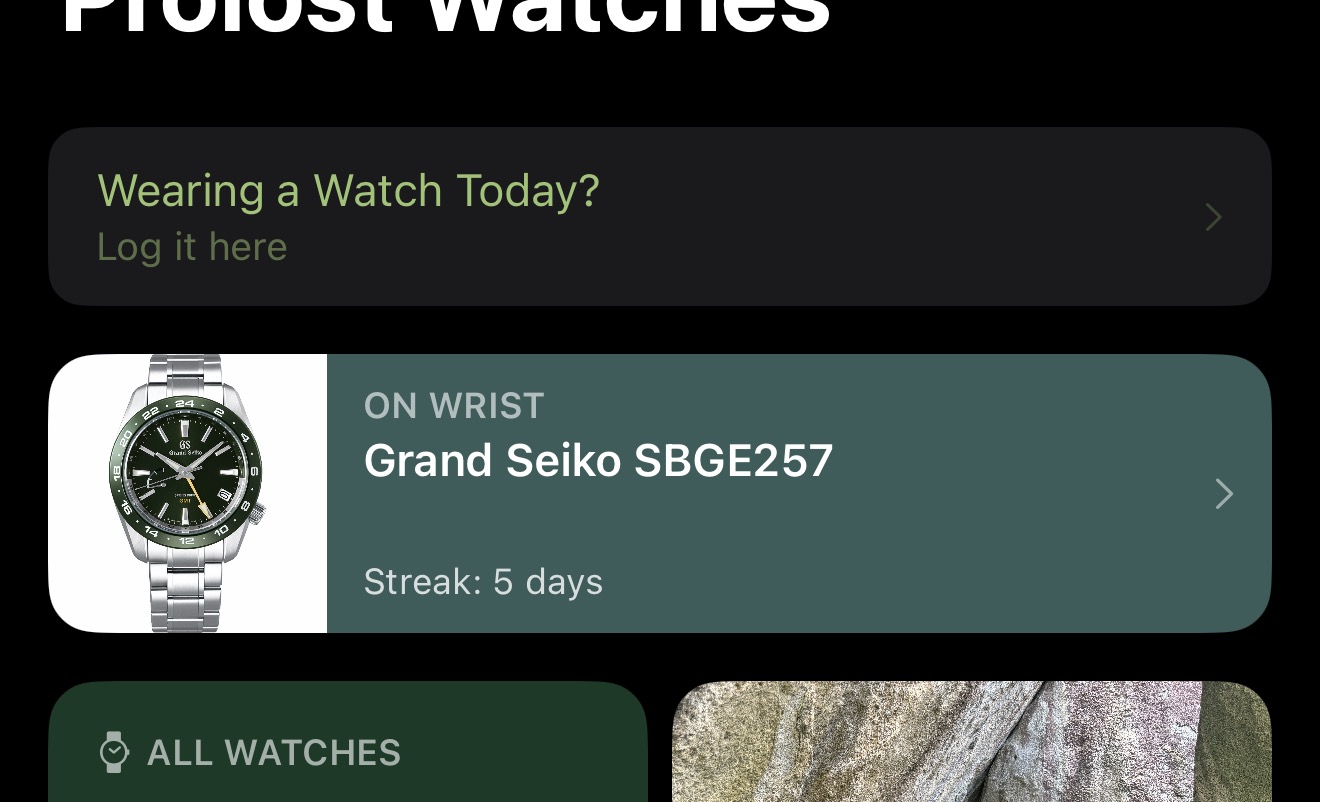
Prolost Watches comes to life when you start logging your daily choice of watch. Over time, these logs reveal the truth about which timepieces have held your attention, and their value.
You can log a “wear” from individual Watch Details, or from the Recently Worn complication. Log a wear for any date from the Wear Calendar.
The Historical Documents
If you have a sense, or even some hard data, about how many times you’ve worn a watch before using Prolost Watches, enter that number in Edit Watch → Previous Wears.
The “Complicated” Interface
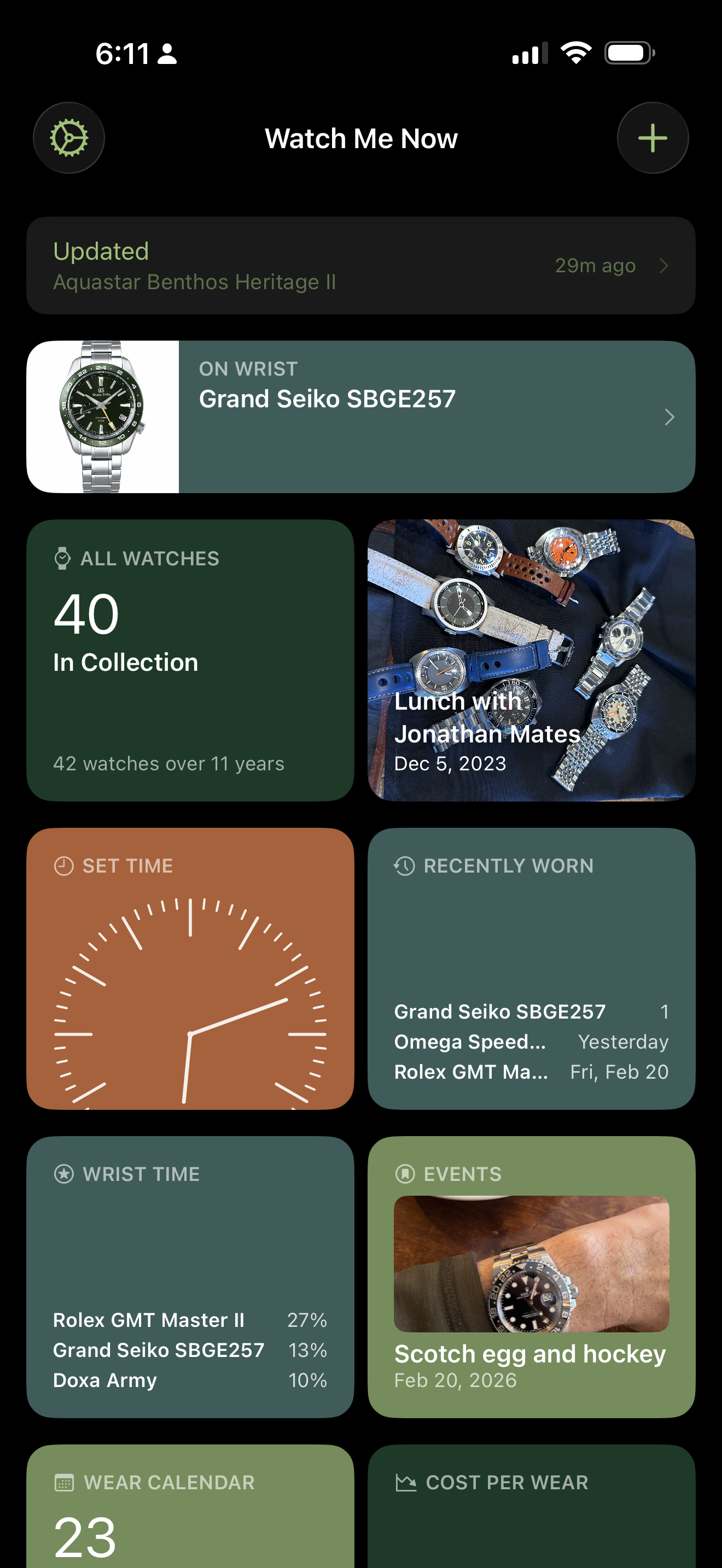
The main screen of Prolost Watches is a grid of “Complications,” each of which offers its own window into your collection. You can re-order these, and turn them on and off to taste, in Settings → Customize Layout.
Nothing is lost when you toggle off a complication, you can always turn it back on later.
All Watches
The hub of Prolost Watches is the All Watches complication. Here you see a graph of your collection count over time, and a sorted, filterable list of all your watches.
At its core, this is your directory for your collection. But the sorting and filtering options bring this view to life. Sort by Date Purchased, Last Worn, or even Wrist Share. Filter by dozens of criteria, including your own custom Tags.
- Show only Dive watches and sort by Depth Rating.
- Sort your Manual Wind watches by Thickness and revel in their sveltetitude.
- Filter by your Could Sell Tag and sort by Value to see opportunities to make room for the future ex Mrs. Left Wrist.
Setting Goals
Every collector has a sense of the “right” size for their collection. Some even follow a strict one-in, one-out policy.
In Settings → All Watches, you can optionally enter your “ideal” collection size under Reference Line. This adds a subtle dashed guide line to the All Watches graph, helping you visualize the perfect collection size. And maybe even work toward it.
Selling a Watch
“And now, little man, I give the watch to you.”
When you sell (or give away) a watch, edit the watch record and add a date and price. This changes the look and function of the Watch Details view for that watch, and is reflected in your Finances charts.
Showcase
The Showcase complication is a rotating gallery of your watches and adventures. It’s my favorite part of the app, because it allows me to enjoy the watches in my collection that I’m not wearing.
In Settings → Showcase, you can customize how often the slideshow advances, and which categories are included.
Set Time
Setting the time on a watch is a lovely ritual where we’re as in touch with the details of the watch’s movement and design as we’re ever likely to be. Prolost Watches features a simple and accurate clock display to help you set your watch to perfection.
Make it Your Own
In Settings → Complications → Set Time, you can choose how you’d like the date displayed, and what kind of clock to show in the complication — analog or digital.
There are a couple of hidden features on the Set Time screen, see if you can find them!
Recently Worn
The Recently Worn complication tracks your recent wrist history with a mini-timeline, and offers easy re-logging of recently-worn watches. Pick your time window and get a scorecard of who has dominated the wrist.
Wrist Time
We talk about it all the time — the watches that captivate our attention earn Wrist Time. Since you’re logging your daily wears, it’s easy to see which watches have had the most time in the sun, and Prolost Watches shows you this in a beautiful chart.
But pure wear count doesn’t tell the whole story. As time marches on, a watch you wore hundreds of times in the past might spend months in the safe while others rotate actively, with lower counts.
So Prolost Watches has the unique concept of Wrist Share. As you wear watches, each logged day earns a score, and these scores diminish over time. Recency matters to Wrist Share — it’s a measure of what you’re actively wearing, expressed as a shared percentage.
Math Life
Wrist Share scores diminish the same way caffeine does in your bloodstream and radiation does in Godzilla’s footprints: via half-life.
The default Half-life for Wrist Share is 120 days. That means if a wear today is worth 10 points, in 120 days it’s worth 5, and in another 120 days it’s worth 2.5.
In Settings → Wrist Time you can adjust this value. Higher values give greater weight to older logs. Try 300 if you want a seasonal favorite to remain in the rankings. Try 30 as an incentive to keep things fresh.
Events
“Something to remember our adventure by.”
The Events complication is a lightweight photo-journal of your adventures with your watches. The best way to start logging an Event is with a photo taken with your phone, because the date and even GPS location will be used automatically.
Purchases and sales with dates also show up in Events.
Each watch has its own Events stream in Watch Details, and the Events complication combines them all into one timeline of your watch journey.
More on Photos
Prolost Watches sometimes has to crop your photos for display. When you add a photo to an Event, you’ll see a small dot. Place it on the watch, or other subject of the photo. This Focal Point guides the cropping to keep the important part of your photo framed in all contexts.
Wear Calendar
Secretly the coolest complication in the app. Yes, the Wear Calendar is another view on what’s recently on-wrist, but magic happens here at the end of every month, and year.
At the end of a full calendar page of logging daily wears, you’ll be offered the monthly Manifest — a custom report of the month’s wrist activity, including a celebration of the watch that dominated your days.
The Manifest can be saved, and shared — if you’re into that kind of thing.
If the Manifest comes at the end of each month, what about the end of the year? We’ll all find out together this December.
Cost Per Wear
“Thirty more years of this and you get a tiny pension and a cheap gold watch.”
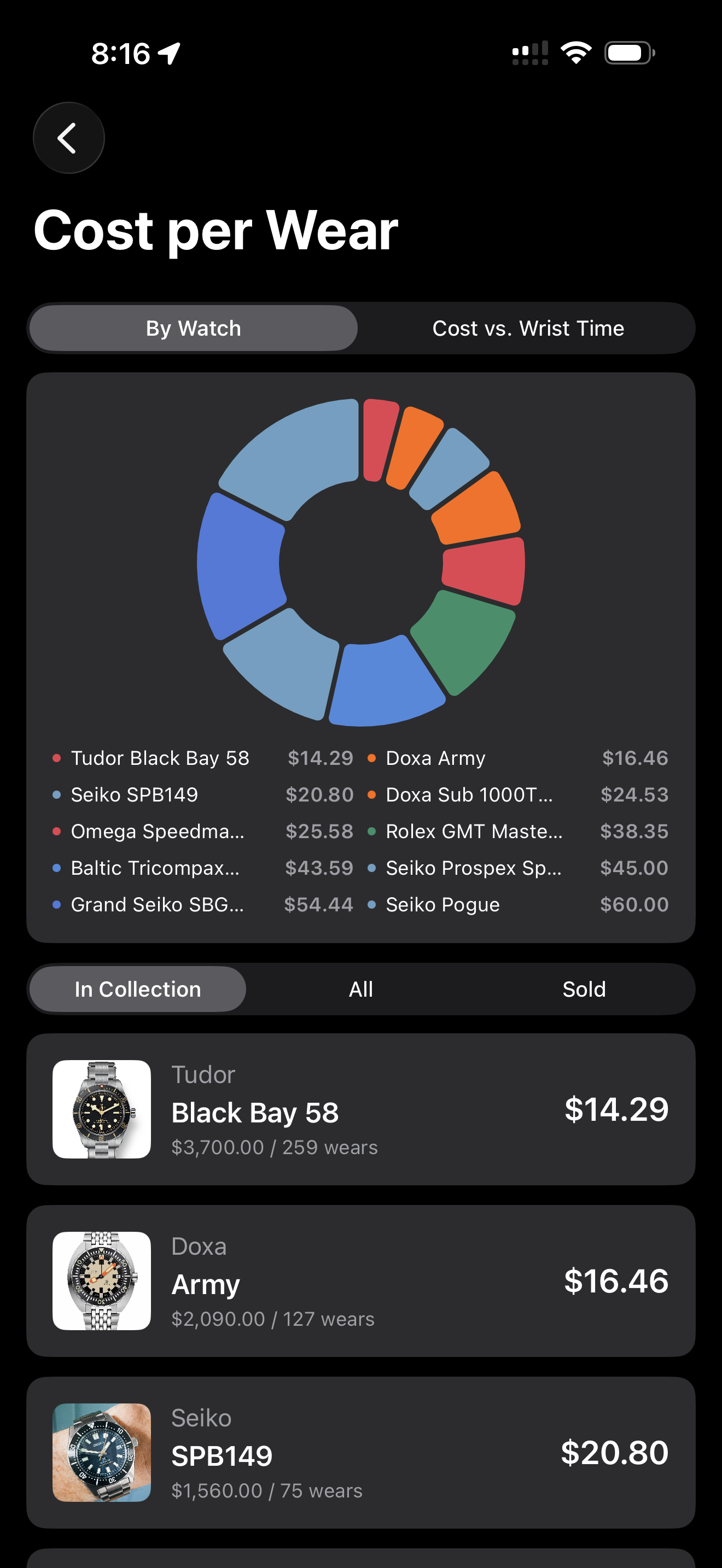
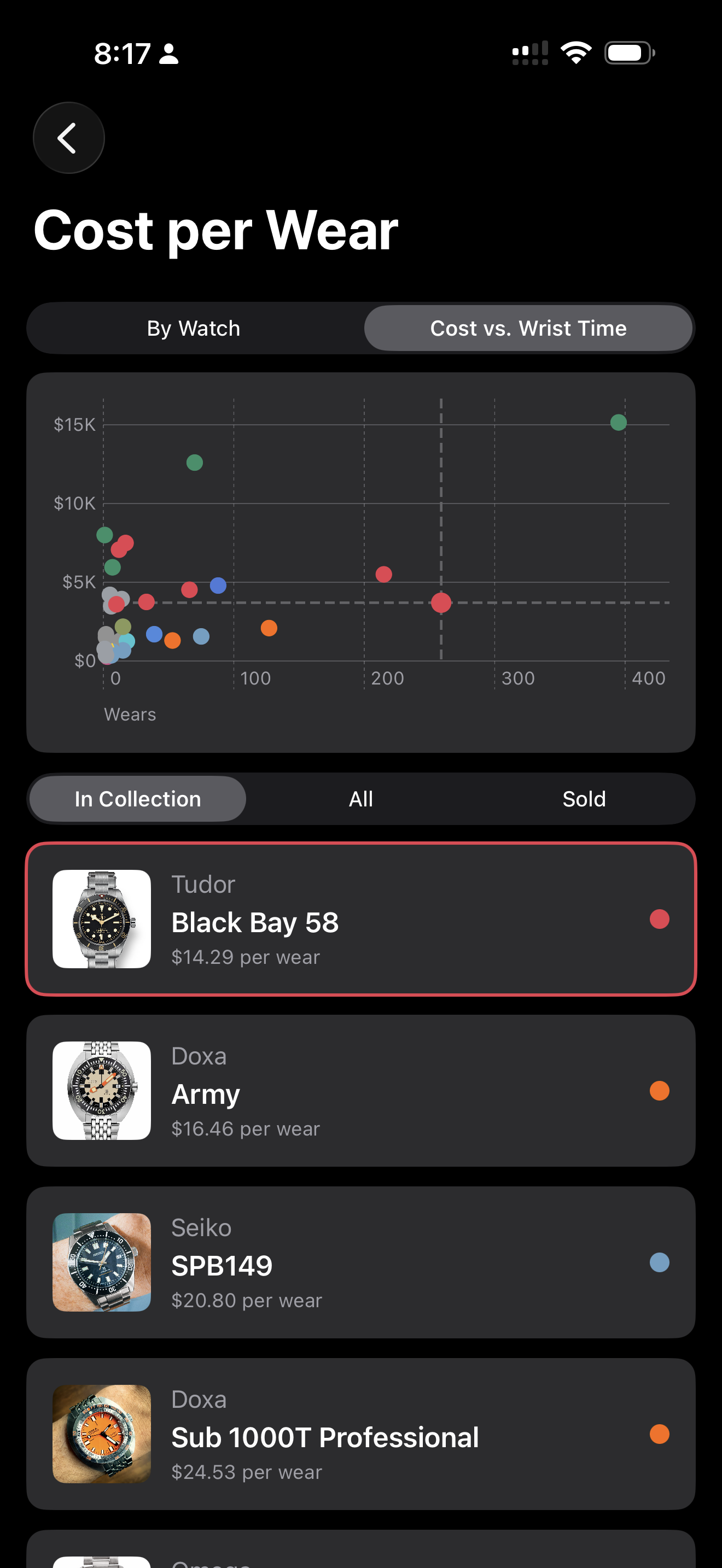
Some find this silly, I find it fascinating. I have a Seiko and a Rolex duking it out for top honors in this simple dollars-per-day metric.
The Cost vs. Wrist Time scatter chart lives here too. This is a fascinating map of the “neighborhoods” of your watches, from upper-left safe queens to the diamonds in the lower-right rough.
Brands
“It’s just a small token of appreciation for all her hard work.”
Another oddly level playing field for collections of a certain size. Which brand dominates your dollar? Is the the dozen Doxas, or the lone Glashütte grail?
Timekeeping for Lumberjacks
“I’d better remind myself again. Ted! Don’t forget to wind your watch!”
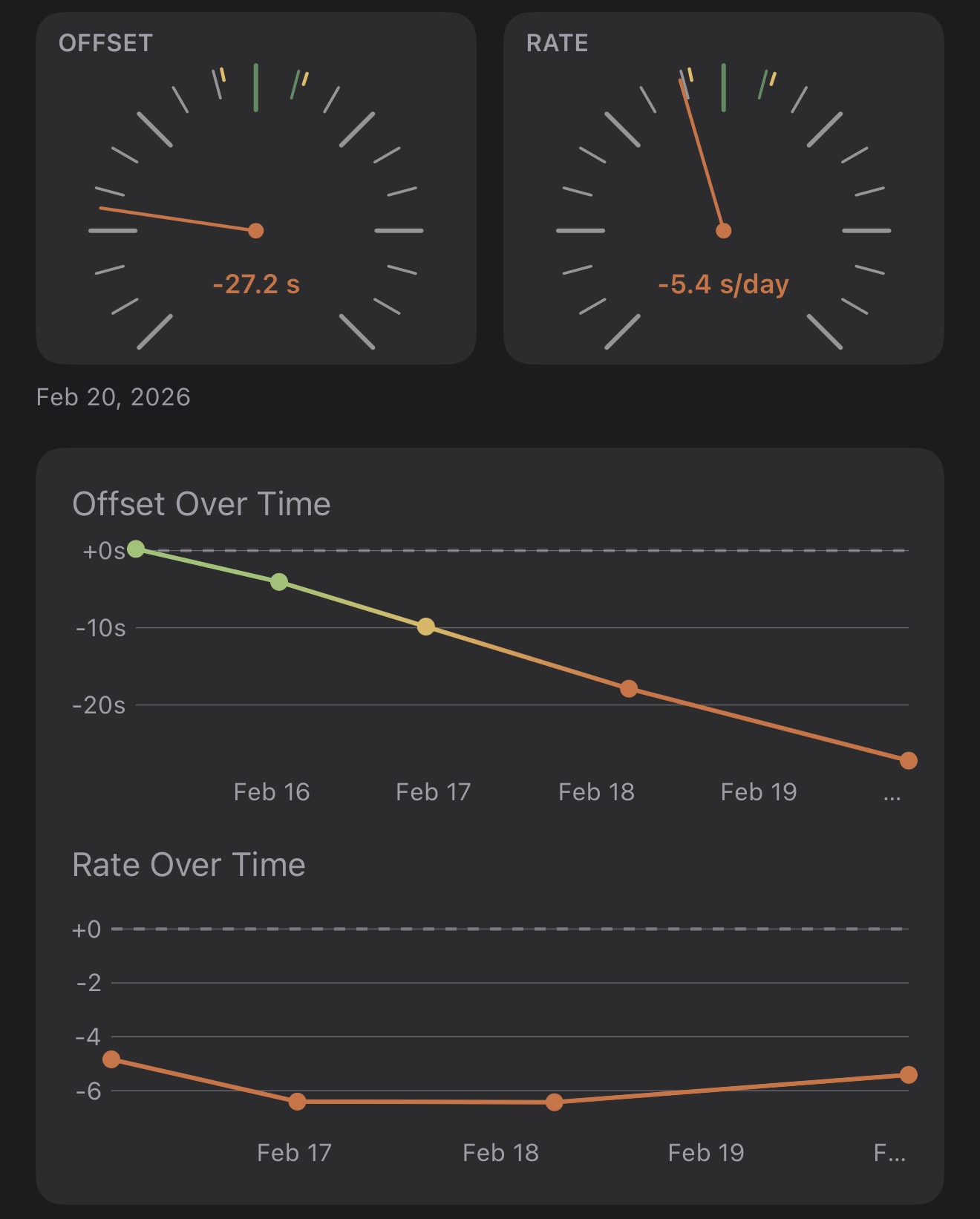
There are apps out there that duplicate the functionality of a timegrapher, listening to your watch movement and recording its accuracy. Prolost Watches works more like we do — on day five of wearing a watch, maybe you start to think it’s running slow? Check it the old fashioned way: by tapping a button. Makes me feel like I’m pausing out commercials on my parent’s VCR.
Timekeeping Tips
A watch can be accurate (or not) in multiple ways. The two that Prolost Watches tracks are:
- Offset — how close is your watch right now to the correct time?
- Rate — how much time does your watch gain or lose over time?
Prolost Watches computes Rate from the two most recent Offset measurements. This sounds complicated, but it’s actually how most of us think of timekeeping — how far did it drift over how many days?
Because this whole operation is only as accurate as your Asteroids-trained button-tapping skills, Offset measurements must be at least six hours apart for a Rate to be derived.
Timekeeping records are color-coded, and you probably spotted the pattern:
Finances
Yes, Finances does show a graph of your watch investment over time. And for that I do apologize.
This complication is either the buzzing hub of your thriving buy/sell/trade activity, or a harsh wake-up call. You can always hide it if the latter is scarily true.
As with All Watches, Finances has an optional setting for a guide line, if you’d like to home in a specific level of investment.
Map
“It tells time simultaneously in Monte Carlo, Beverly Hills, London, Paris, Rome, and Gstaad.”
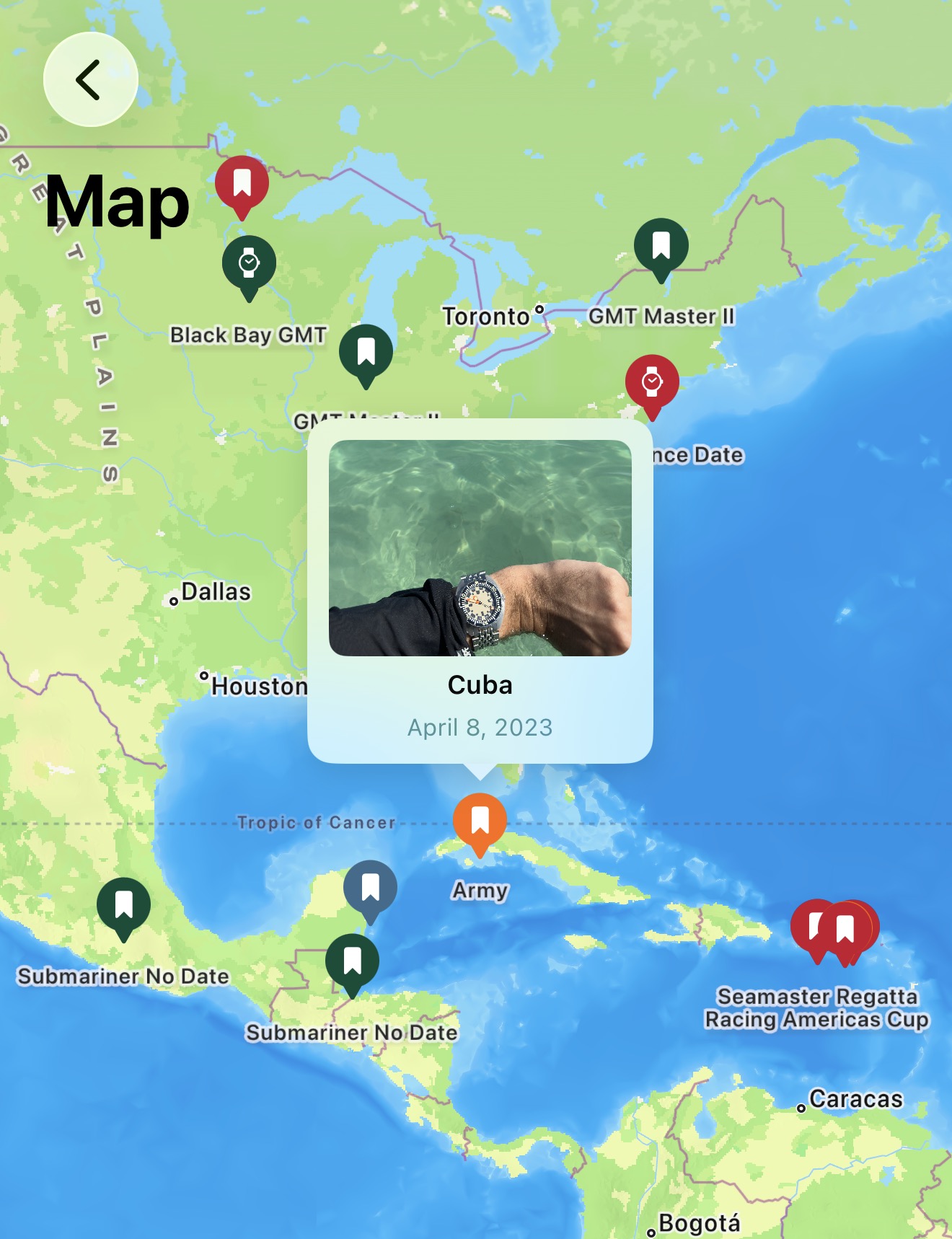
Events and purchases with locations appear on the Map. Tap the pins for a mini preview. I get way too much enjoyment from this simple feature, reliving wonderful memories of travel, adventures, and most certainly watches.
It’s a Carousel
Some days you know exactly which watch to wear. And some days… maybe let fate decide.
The Carousel is a deceptively simple random roll of the dice, that you gently guide by picking a mood (Neglected? Favorite?), and maybe a broad type of watch. Then spin, and see where it lands.
There’s an odd giddy delight in promising yourself you’ll abide by the choice.
“When a man becomes preeminent, he is expected to have… enthusiasms.”
I hope you’ll find, as I have, that Prolost Watches is more than just a tool. It’s a way to hold your entire collection in your hand. To understand it, hone it, manage it.
But most importantly, to enjoy it.